TATAMI,為掌機而生的 groovebox。按鍵不多,聲音和節奏卻來得很快——即興、現場、錄音,或單純享樂,隨你喜歡。
TATAMI is a groovebox built for handheld game consoles. Its focus is on quick, hands-on control of sounds and patterns — for jamming, live sets, recording, or just for fun. Your call.
這裡是給朋友的網頁測試版,可以直接瀏覽器裡運行,手機、平板、電腦皆可,無需任何硬體。*切莫外傳
This is a web test build for friends. It runs right in your browser — phone, tablet or computer, no hardware needed. *Please don't share it.
TATAMI 一覽
TATAMI at a glance
4 × FM 軌:
4 × FM tracks with:
- 3 個 OP,各有 TUNE、FDBK 與 ENV
- OP ROUTING、PITCH SWEEP
- FILTER:經典 SVF12/SVF24,LP↔BP↔HP 連續 MORPH;另有 ACID、COMB、MODAL
- OVERDRIVE、BR、SRR
- 每個音色 3 組 MOD
- three operators with ratio, feedback and envelopes
- operator routing and pitch sweep
- filter: classic 12 and 24 dB state-variable, morphing continuously from low-pass to band-pass to high-pass; plus acid, comb and modal types
- overdrive, bit reduction and sample-rate reduction
- three modulators per sound
4 × SAMPLE 軌:
4 × sample tracks with:
- SLICE、WAVETABLE
- FLOAT:即時 resample 其他軌道,並序列化重組
- FILTER、AMP、FX 與 FM 軌共用一套
- slices and wavetables
- float: resample other tracks live and resequence them
- the same filter, amp and effects as the fm tracks
1 × FX 軌:DELAY/CHORUS/REVERB,序列化你的 FX 參數。
1 × FX track: delay, chorus and reverb, with sequenced effect parameters.
SEQUENCER:
Sequencer with:
- 26 個 project
- 每個 project 可儲存 64 個 scene,外加 SONG
- 每軌可儲存 16 個 pattern,最長 64 步
- P-lock:任何參數都能鎖在任何一步
- trigless、RETRIG、GLIDE、MICRO、COND
- FM 軌和弦,最多 4 音
- 每軌一台 ARP
- DICE 生成 pattern,SHAKE SHAKE 生成變奏
- 17 種演奏用 SNACK
- MIDI IN/OUT,CLOCK 收送
- 26 projects
- 64 scenes per project, plus song mode
- 16 patterns per track, up to 64 steps each
- parameter locks: any parameter on any step
- trigless steps, retrig, glide, micro timing and trig conditions
- chords up to four notes on fm tracks
- an arpeggiator per track
- dice for instant patterns, shake shake for variations
- 17 snacks for live performance
- midi in and out, clock send and receive
鍵盤/手把:
Keyboard / controller:
所有編輯自動儲存在此瀏覽器;重新整理不會遺失。
Everything you make is saved in this browser as you go. Reloading the page is fine.
存檔僅存在此瀏覽器,換瀏覽器或裝置即無法讀取。iPhone 可能清除久未開啟網站的資料,請定期「匯出備份」。
Your work lives in this browser only — another browser or device won't see it. iPhones may clear data for sites you haven't opened in a while; export a backup regularly.
上傳與備份位於 ⋯ 選單:
Uploads and backups live behind the ⋯ button:
匯入音檔至目前 project 的 SAMPLES。支援 WAV、AIFF、MP3、FLAC,每檔最長 60 秒。puts your own sounds into the sample tracks of the current project. WAV, AIFF, MP3 and FLAC all work, up to 60 seconds each.
匯入 LIBRARY,於 MENU › LIBRARY 剪輯、試聽後再送入 project。puts them into the LIBRARY, where you can trim, preview and send them to a project later.
將所有 project 與 LIBRARY 匯出為一個 zip。downloads every project and the whole LIBRARY as one zip.
由 zip 完整還原,會覆寫現有內容(執行前確認)。restores everything from a zip. It replaces what's there, so it asks first.
L3/R3 在網頁版為螢幕按鍵;手把為搖桿按下,電腦鍵盤為 F/J。也可用 START+L2/R2 操作 SNACK。PLAY=B+START 的捷徑。
On the web, L3 / R3 are on-screen buttons; on a controller they are the stick clicks, on a keyboard F / J. START + L2 / R2 also works for snacks. PLAY is a shortcut for B + START.
單按於放開時觸發;按住再按其他鍵為組合鍵,此時放開不觸發單按功能。
Tap: counts on release. Hold + another button: a combo — releasing after a combo doesn't count as a tap.
SCALE 與 ROOT:按住 SELECT 時預選,放開後套用。
Scale and root are picked while you hold SELECT and only change when you let go.
每軌有一組軌道參數,每一步都能以 P-lock 覆寫其中任何參數。游標在軌名上編輯=修改軌道參數;游標在步上編輯=寫入該步的 P-lock。
Every track has a set of track parameters, and any step can override any of them with a parameter lock. Edit with the cursor on the track name to change the track parameters; edit on a step to write a parameter lock for that step.
trigless 步不觸發音符,只以 P-lock 改變正在發聲的音符。
A trigless step doesn't start a new note — it changes the parameters of the note that's already sounding.
停止時,在 trig 上按 試聽此步。
While stopped, press on a trig to hear it.
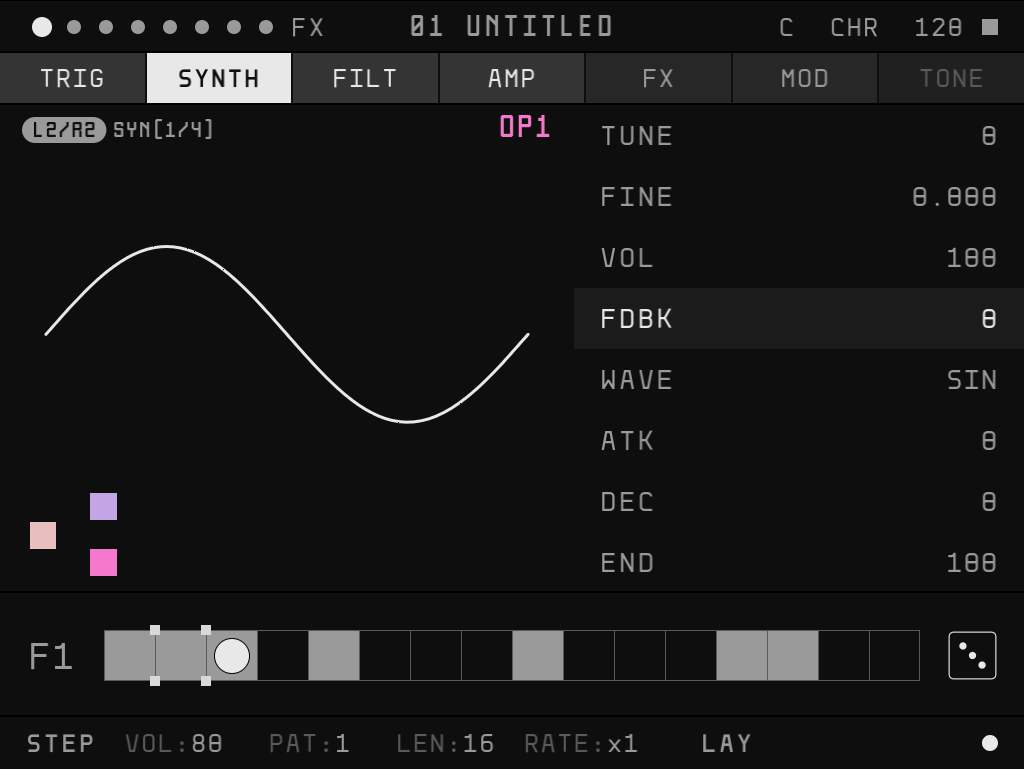
按住 進入參數編輯。
Hold to edit.
寫入位置取決於游標:軌名上=軌道參數;步上=該步的 P-lock(空步會自動輸入 trig)。按住 操作相同,但輸入的是 trigless 步。
Where the value goes depends on the cursor: on the track name it changes the track parameters, on a step it becomes a parameter lock (an empty step gets a trig). Holding works exactly the same, but writes a trigless step instead.
停止時按住 A 會持續觸發此軌,可即時監聽參數變化;放開 A 進入 release。
While stopped, holding A keeps the note sounding, so you hear every change as you make it. Let go of A and the note fades out.
鎖定後等同持續按住 A(或 X),再按一次相同組合解除。鎖定期間無法移動游標、切換軌道或翻頁,編輯對象固定為鎖定時所在的步。
Once locked, every button behaves as if A (or X) were held, until you press the same combination again. While locked you can't move the cursor, change track or turn the page — you edit the step you locked on.
播放中,於軌名上按住 編輯參數=即時錄製參數自動化,依播放位置逐步寫入 P-lock;放開 X 停止錄製。整段錄製為一次 UNDO。
While playing, hold on the track name and change a parameter: your moves are recorded into the steps as the playhead passes them. Let go of X to stop. The whole take is a single undo.
TRIG 頁的 NOTE: 向上疊加和弦音、 向下疊加和弦音,FM 軌最多 4 音。音高重疊時自動合併。
On NOTE in the TRIG page, adds a note above and a note below — up to four notes on FM tracks. Move one note onto another to merge them.
在軌名上改和弦(加音、刪音、移動最低音以外的音)時,P-lock 了 NOTE 且和弦形狀與軌道參數相同的步會一起改:跟調的軌照音階級數,例如 C 大調軌名 C 加成 C-E-G,D 那步會變成 D-F-A;不跟調或不在音階上的音照半音。自己另外寫成不同和弦的步不受影響。移動最低音=整體移調,所有 P-lock 的音高照舊一起移。
Editing the chord on the track name — adding or removing a note, or moving any note but the lowest — also reshapes every step whose NOTE is P-locked to the same chord shape. On a track that follows the key it moves by scale degrees: C becomes C-E-G on the track name, and a step on D becomes D-F-A. Otherwise, or for notes outside the scale, it copies the semitones. Steps you wrote as a different chord are left alone. Moving the lowest note transposes everything, as before.
部分參數的 A+L2/R2 另有功能:LEN、FQ 切換至微調層;TONE 頁為試聽 preset。
Some parameters give A+L2/R2 a job of their own — LEN and FQ switch to a fine layer, the TONE page previews presets.
TRIG 頁的 COND 決定這一步在哪些循環發聲:10%–90% 依機率;100% 每次都響;A:B 每 B 次循環的第 A 次響;1ST 只在第一次循環響(按 PLAY 或切換 pattern、scene 後重新算),適合寫一個長音、之後不再被自己觸發;1ST(下劃線)第一次不響、之後每次都響;A:B(A 下劃線)每 B 次循環的第 A 次不響。下劃線=「這一次不響」,圖示上也是那一格空心、底下一條線。
COND on the TRIG page decides which loops a step plays on: 10%–90% by chance; 100% every time; A:B on the Ath of every B loops; 1ST only on the first loop (counted again after PLAY or a pattern or scene change) — handy for a long note that shouldn't retrigger itself; 1ST (underlined) on every loop but the first; A:B (A underlined) on every loop except the Ath of every B. The underline means “not this one” — the icon draws that box hollow with a line under it.
切換 CONTROL ALL:修改一軌的軌道參數時,同類軌道(FM 或 SAMPLE)的同一參數同步變動。
turns on Control All: changing one track's parameters also moves the same parameter on every other track of the same kind (FM or sample).
按住 編輯底欄。
Hold to work on the bottom bar.
VOL軌道音量。track volume.
PAT此軌播放的 pattern(1–16)。按住 Y 時預選,放開後切換。切到未使用的 pattern 時,內容整份複製自切換前的 pattern。which of the track's 16 patterns is playing. You pick while holding Y; it changes when you let go. Switching to an unused pattern copies the whole pattern you were on.
LENpattern 長度,最長 64 步。於 LEN 上 一次增減 16 步。length, up to 64 steps. On LEN, adds or removes 16 steps at a time.
RATE此軌的播放速度倍率。how fast the track moves.
LAYVOICE MODE:LAY 複音疊加、MONO 單音、LEG legato(SAMPLE 軌無 LEG)。voice mode: LAY stacks notes, MONO plays one at a time, LEG glides between them (sample tracks have no LEG).
Scene 儲存整首曲子當下的狀態:各軌 pattern、MUTE、音量、BPM、調性、SWING、COMP,以及兩個 SNACK 的配置;每個 project 64 個。 僅在已使用的 scene 間切換,同樣放開 Y 後生效。SAVE、SAVE TO、RELOAD 位於 QUICK MENU。
A scene remembers the whole song as it is right now — which pattern every track plays, mutes, volumes, tempo, key, swing, the compressor, and which snacks sit on L2 and R2. There are 64. only steps through scenes you've used, and again changes when you let go of Y. Save, save to and reload live in the quick menu.
選取範圍後:/ 將範圍內的空步全部輸入 trig/trigless, 清除範圍,按住 A 編輯=整段相對修改(以第一步為基準)。於軌名上複製貼上=整軌。
With a range selected, / fills its empty steps, clears it, and holding A edits all of it at once, relative to the first step. On the track name, copy and paste take the whole track.
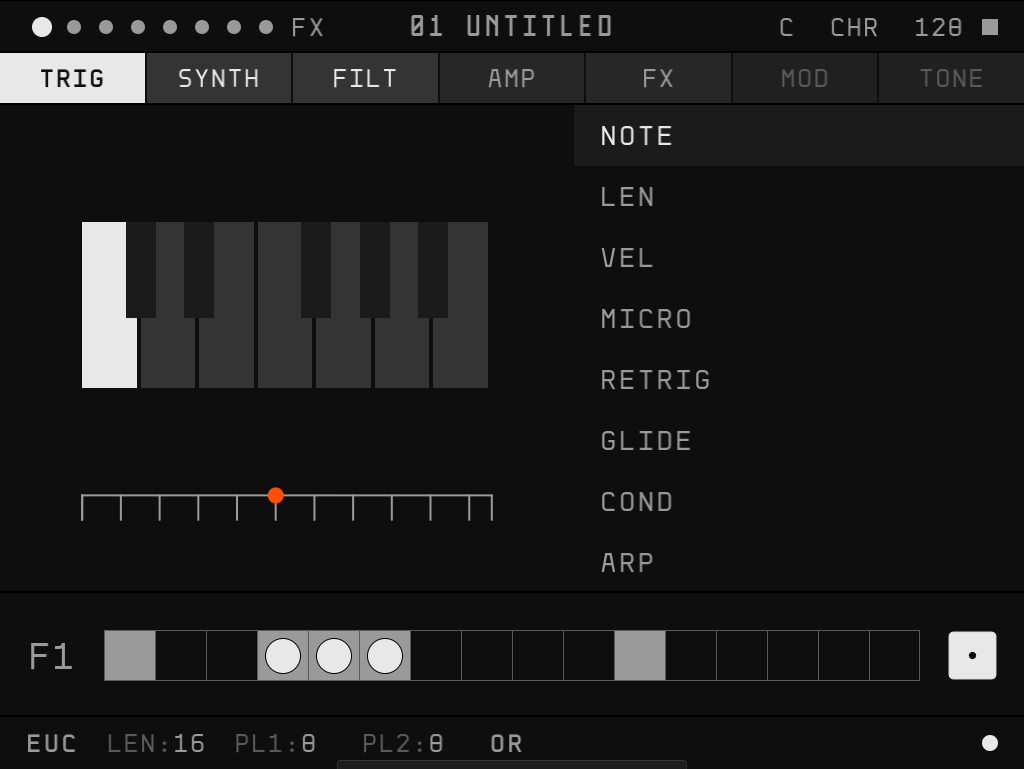
游標位於 DICE 時,單按 重新生成此軌。
With the cursor on the dice, tap to roll a new pattern for the track.
DICE 點數=下一次生成的變化幅度,由微幅變奏到完全重新生成;連續生成時幅度遞增。
The face of the dice shows how far the next roll will go — anything from a small variation to something completely new. Keep rolling and it gets bolder.
SHAKE SHAKE
SHAKE 對整個 pattern 的指定參數做隨機偏移:每一步以自身數值為中心擴散,加大步與步之間的差異。
Shake pushes one parameter apart across the whole pattern: every step moves away from where it is, so the steps become more different from each other.
DICE 的底欄:LENRATE 與 STEP 底欄是同一組軌道參數,只改長度與速度、不會動到已寫的步;PL1PL2 為 Euclidean 產生器的兩組 pulse,以 OR/XOR/AND/SUB 合成,改這幾欄才會重新排列整條 trig(一次一個 UNDO)。按住 A 可在參數上設定 +/- TAG、在 TONE 頁的 preset 上標記 ★,供 MASH MASH 與 MELT MELT 使用。
On the dice, LEN and RATE in the bottom bar are the same track settings as in the step view — they change the length and speed and leave your steps alone. The rest is a euclidean generator: two sets of pulses, PL1PL2, combined with OR, XOR, AND or SUB; changing those rewrites the trigs (one UNDO each time). Holding A tags parameters with + or −, or stars a preset on the TONE page — that's what MASH MASH and MELT MELT play with.
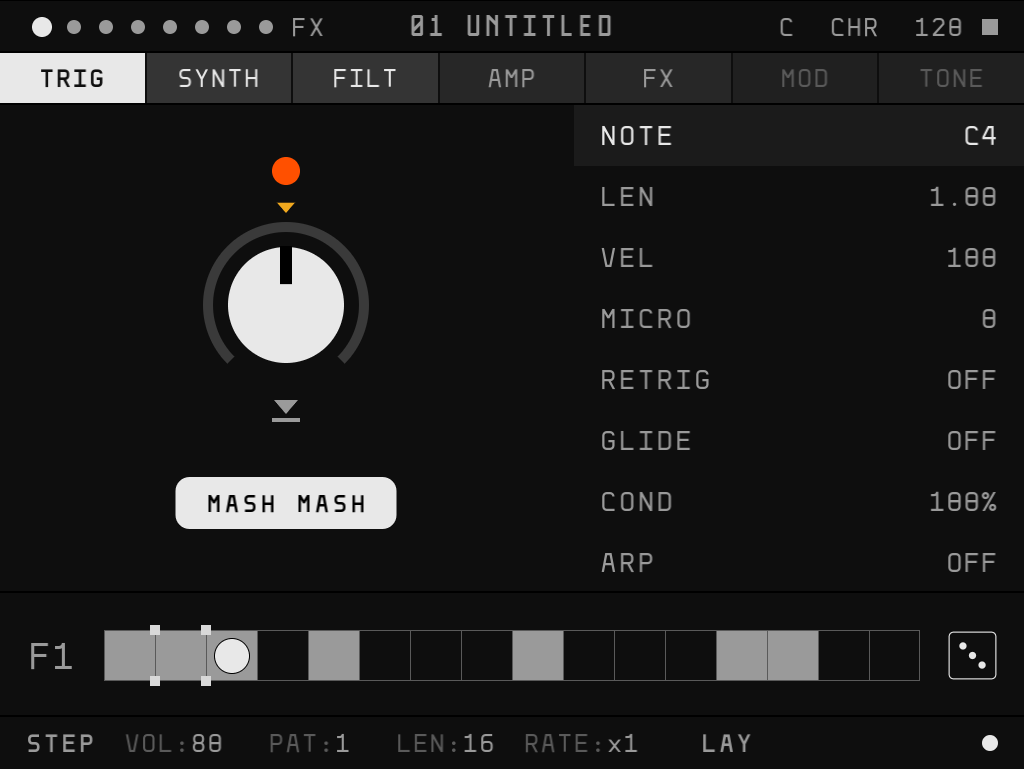
SNACK 是按住時才作用的演奏效果。按住 /(或 /),以十字鍵操作;放開即還原。
Snacks are performance effects that only last while you hold them. Hold or — or simply / — and play with the D-pad. Let go and everything snaps back.
左右各配置一個 SNACK,於 MENU › SNACKS 指定。L3/R3 在主畫面與 MENU 中皆可使用。
Each of the two slots holds one snack; choose them in MENU › SNACKS. L3 and R3 work on the main screen and inside the menu too.
部分 SNACK 可寫入結果:按住時按 ARM,放開時將結果寫入 pattern(GROOVE、WANDER、SWAP、MASH MASH、MELT MELT);MASH MASH、MELT MELT 另可按 立即寫入。
A few can keep what they did: press while holding to arm, and the result is written into the pattern when you let go (GROOVE, WANDER, SWAP, MASH MASH, MELT MELT). MASH MASH and MELT MELT can also write on the spot with .
共 9 軌:F1–F4 為 FM,S1–S4 為 SAMPLE,最後一軌為 FX。
There are nine tracks: F1–F4 are FM synths, S1–S4 play samples, and the last one is the FX track.
TONE 頁按住 A: 選擇、 載入、 儲存(先命名)、 試聽。於軌名上載入=取代軌道參數;於步上載入=寫入該步的 P-lock。preset 庫所有 Project 共用,存在 LIBRARY/TONE/;SAMPLE preset 會把採樣一起存進庫,在任何 Project 載入都直接使用庫裡的檔,不佔 Project 的素材名額。FLOAT preset 只存切法與收法,載入後的來源維持該軌原本的設定;TONE 頁預覽顯示存檔當時收到的波形。
On the TONE page, hold A: to choose, to load, to save (you'll name it first), to preview. Load on the track name to replace the track parameters; load on a step to write it as parameter locks on that step. The preset library is shared by every project and lives in LIBRARY/TONE/; a sample preset takes its sample along into the library, so it plays from there in any project without using up that project's sample slots. A FLOAT preset keeps only how the buffer is sliced and captured — the track keeps its own source — and its preview shows the sound that was in the buffer when you saved it.
FX 軌有 TRIG、DELAY、CHORUS、REVERB 四頁。其他軌由各自的 FX 頁以 send 送入;FX 軌的步可對效果參數做 P-lock。
The FX track has four pages: TRIG, DELAY, CHORUS and REVERB. Other tracks send sound to it from their FX page, and its own steps can parameter-lock the effects.
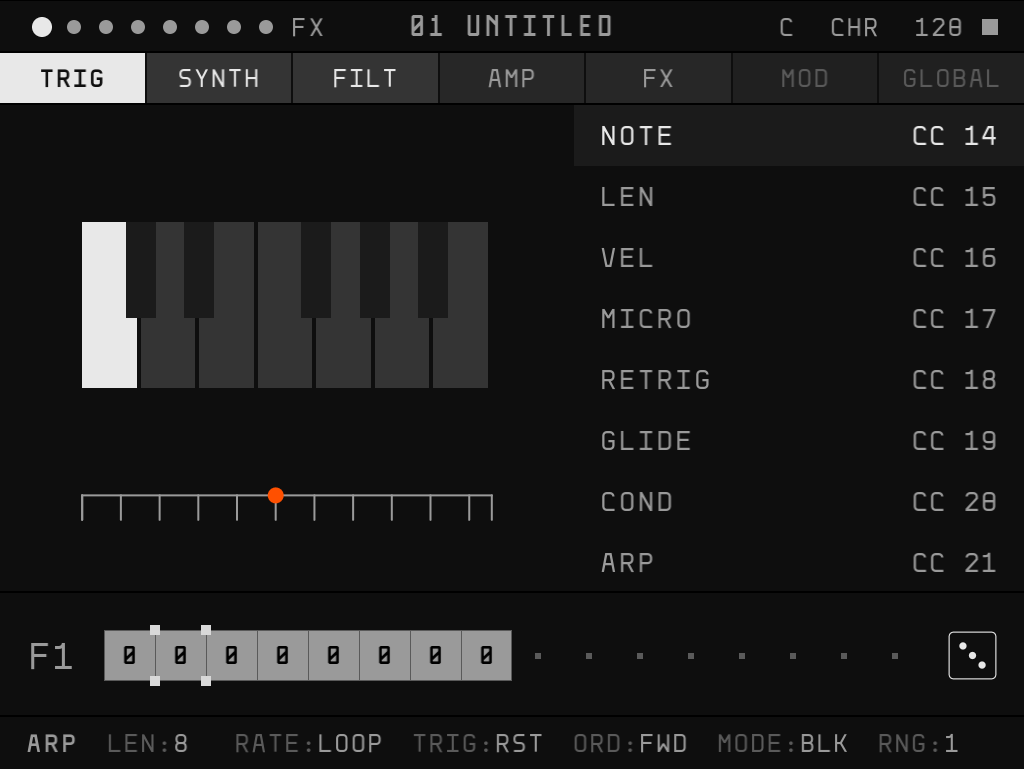
單按 ,下半部切換為此軌的 ARP。ARP 每一步=相對原音的半音偏移;在 TRIG 頁開啟某一步的 ARP,該步即依此序列觸發。
Tap and the lower half turns into the track's arpeggiator. Each step is an offset in semitones from the note. Switch ARP on for a step in the TRIG page, and that step plays through this row.
RATE 設成 LOOP 時,這一軌每繞一圈才往前走一格:同一圈裡所有開 ARP 的步都用同一個偏移,整段像一條「每圈換一次調」的移調序列。跟調的軌上,和弦會順著音階一起移動(例如 C 大三 +2 變成 D 小三),不會變形。
With RATE set to LOOP, the row moves one step each time the track loops: every ARP step in that loop gets the same offset, so the row becomes a transposition sequence, one change per loop. On a track that follows the key, chords move along the scale as a whole (C major +2 becomes D minor) instead of being bent out of shape.
TRIG 設成 RST 時,每個開 ARP 的步都從序列第一格重新開始,RNG 的八度則跟著主序列走:這一軌每播完一個循環往上一個八度,到 RNG 上限回到原八度,所以步再短也聽得到 RNG。設成 FRE 時,序列與八度都接著上一個步繼續,每跑完一輪 ARP 序列往上一個八度。按 PLAY、切換 pattern 或 scene 時歸零。
With TRIG on RST, every ARP step starts the row from the top, and RNG follows the main sequence: the octave goes up each time the track loops, then wraps back once it reaches the RNG range — so you hear RNG even on short steps. With TRIG on FRE, the row and the octave carry on from the previous step, and the octave goes up each time the row completes. PLAY and switching pattern or scene start it over.
ARP 視圖中,游標在 DICE 上單按 =擲這一軌的 ARP:偏移、休止、LEN、RATE 等會一起改變,幅度同樣由 DICE 點數決定(小改到整組換成另一種琶音),一次擲骰=一次 UNDO。跟調的軌照音階擲,不跟調的軌只用八度與五度。
In the ARP view, tap on the dice to roll the track's arpeggiator: offsets, rests, LEN, RATE and the rest change together, as far as the dice face says — from a small tweak to a whole different kind of arpeggio. One roll is one UNDO. Tracks that follow the key roll in the scale; the others stick to octaves and fifths.
ARP 視圖中,上半部的參數列切換為 MIDI CC 對照:按住 A 並轉動控制器旋鈕即完成 learn。
In the ARP view, the parameter list turns into a MIDI CC map: hold A and turn a knob on your controller to learn it.
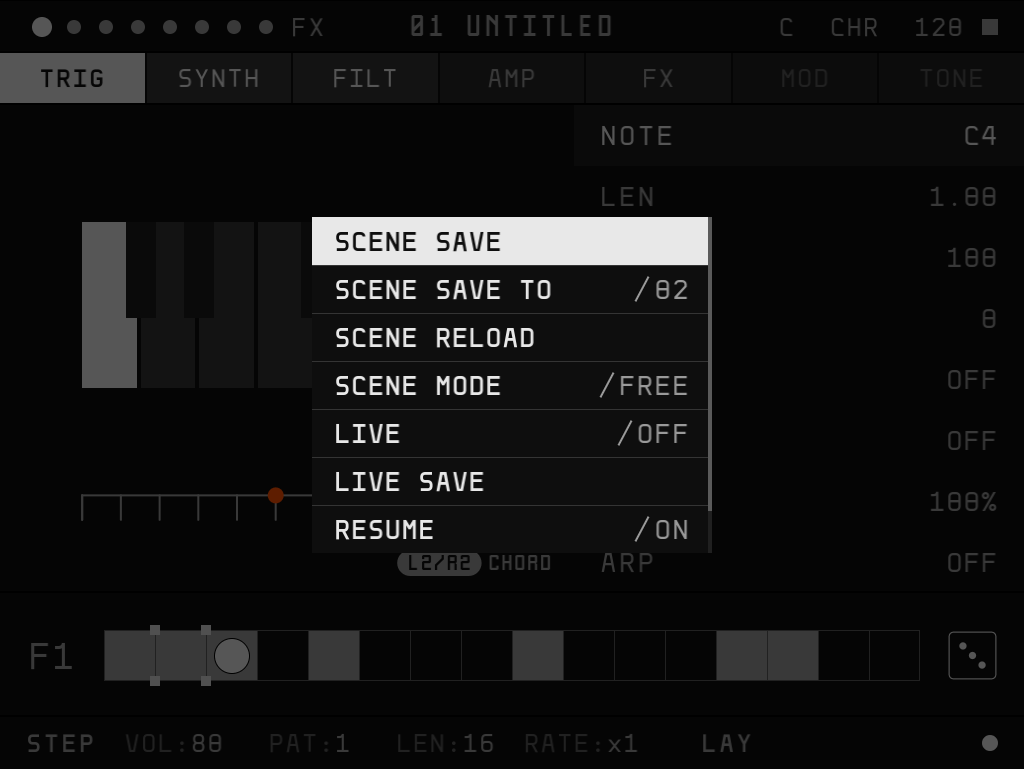
單按 開啟 QUICK MENU: 選擇、 修改、 執行,SELECT 或 B 關閉。
Tap for the quick menu: to choose, to change, to do it, SELECT or B to close.
SAVESCENE SAVE/SAVE TO/RELOAD:儲存目前 scene、另存至其他 scene、還原至上次儲存。scene save, save to and reload: keep this scene, copy it to another slot, or go back to how it was saved.
MODESCENE MODE:FREE 立即切換,ALIGN 於本循環結束時切換。scene mode: FREE switches right away, ALIGN waits for the loop to come around.
LIVE開啟後的編輯不寫入存檔;需保留時執行 LIVE SAVE。play freely without saving anything; keep it with LIVE SAVE if you like it.
RESUME播放從停止位置繼續。pick up where you stopped when you press play again.
REC由 MIDI 鍵盤或控制器即時錄製;開啟後顯示 QUANTIZE、METRONOME、COUNT-IN、REC END。record from a MIDI keyboard or controller in real time; turning it on reveals QUANTIZE, METRONOME, COUNT-IN and REC END.
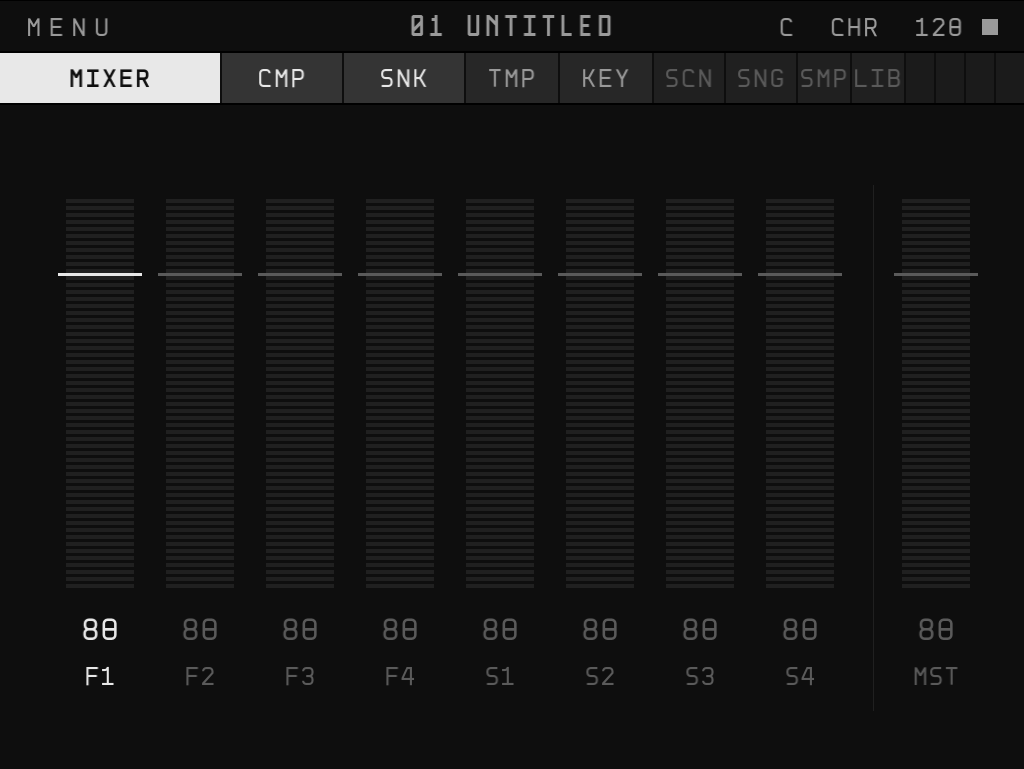
單按 開啟 MENU: 換頁、 選列、 改值、 返回。
Tap for the menu. changes page, chooses a row, changes it, goes back.
瀏覽器詢問 MIDI 權限時請允許。支援熱插拔。
Allow MIDI when the browser asks. Plug and unplug any time.
CHANNEL、CLOCK(SEND 送出、RECEIVE 跟隨外部)與 CC 對照位於 MENU › MIDI。外接旋鈕可直接控制參數;QUICK MENU 的 REC 開啟且播放中時,旋鈕變化會錄製為參數自動化。
Channels, clock (SEND to lead, RECEIVE to follow) and CC maps are in MENU › MIDI. Turning a knob on your controller edits parameters; with REC on in the quick menu and the sequencer running, your knob moves are recorded into the steps.
iPhone 的 Safari 不支援 MIDI,請改用支援 Web MIDI 的瀏覽器 app。分頁位於背景時,MIDI CLOCK 送出會暫停。
Safari on iPhone has no MIDI; open this page in a browser app that supports Web MIDI. While the tab is in the background, the outgoing MIDI clock pauses.